The CloudPros cloud and DevOps curriculum moves from Linux and Git to delivery pipelines, cloud infrastructure, and operating a running system.
20 weeks in five modules: 16 core weeks, 3 recap weeks and a bonus MLOps week. A recap week closes each of the first three modules, so each topic builds on work you can test and explain.
Linux, networking, Git and Python: the skills you use every time you automate, deploy or troubleshoot.
Week 1
Linux Fundamentals and Shell Scripting
+
The vast majority of cloud servers run Linux. Before you can manage infrastructure, deploy containers, or configure cloud services, you need to be fluent in the Linux command line. This week takes you from zero to navigating, managing files, and understanding the operating system that powers most of the modern internet, including AI training clusters and inference servers.
Linux Essentials
Master the Linux command line and system fundamentals that power every cloud server.
Linux distribution overview and when to use which
File system navigation and structure (/etc, /var, /home, /opt)
File and directory permissions (users, groups, chmod, chown)
User and group management
Package management (apt, yum, dnf)
Process management and basic system monitoring (ps, top, htop, df, du)
Shell Scripting and Automation
Learn to automate repetitive tasks with shell scripts, the foundation of DevOps automation.
Advanced command line usage (pipes, redirection, grep, sed, awk)
Build a bash script that monitors a specific process and automatically restarts it if it crashes. Test it by killing the process manually and watching your script bring it back. Add logging so every restart is recorded with a timestamp.
Between sessions
Practice navigating the Linux filesystem until `cd`, `ls`, `find`, and `grep` feel natural. Write at least two bash scripts that automate something on your server. Read about the OSI model (7 layers), focus on layers 3, 4, and 7. Learn what an IP address, subnet, and port number are. Try running `ping`, `traceroute`, and `nslookup` on your Linux server.
Week 2
Networking for Cloud Engineers
+
Networking is the invisible foundation of everything in the cloud. Every request, every deployment, every API call travels across a network. If you cannot debug a connectivity issue, you will be stuck on problems that take minutes to solve once you understand the fundamentals.
Core Networking Concepts
Master the networking fundamentals that underpin all cloud operations.
OSI model vs TCP/IP and how they map to real tools
TCP/IP essentials: IP addressing, ports, protocols (HTTP/S, SSH, DNS)
Subnets and CIDR notation
DNS and core network services (records, name resolution, service discovery)
Firewalls and basic network security (ingress/egress rules, server hardening)
Practical Networking and Troubleshooting
Learn to think like a network debugger and solve real connectivity issues.
Understanding connectivity issues between services
Networking in load balancers, ingress, and service discovery
How cloud networking differs from traditional networking
API gateway patterns and how AI inference APIs are exposed
Debugging real-world scenarios: 'app is up, but users can't reach it'
Your practical challenge
Set up two Linux servers and configure them to communicate over a private network. Then deliberately break connectivity in three different ways (DNS, firewall, routing) and document how you diagnosed and fixed each issue.
Between sessions
Practice networking troubleshooting commands until they feel natural. Create a GitHub account if you do not have one. Install Git on your local machine and your Linux server. Read about why version control matters in infrastructure engineering. Try running `git init` in a test directory and making your first commit.
Week 3
Git and Version Control
+
Every piece of code and every infrastructure configuration you write needs version control. Git is the universal tool for tracking changes, collaborating with teams, and maintaining a history of your work. In the AI era, Git is not just for application code-it is for Terraform modules, Kubernetes manifests, CI/CD pipelines, and even AI model configurations.
Git Fundamentals
Master Git basics and learn how to track changes and manage code history.
Git fundamentals (commits, branches, remotes) and how Git stores history
Initial repository setup and structuring DevOps/infrastructure projects
Core commands (clone, add, commit, push, pull) and local workflows
Learn professional Git workflows used by DevOps teams, including pull requests and GitOps.
Collaborative development with pull requests and code reviews
Resolving merge conflicts and using rebase safely
GitHub best practices (issues, project boards, protecting branches)
Branch protection rules and approval workflows
Git hooks for automation
Introduction to GitOps: managing infrastructure through Git
Integrating Git with CI/CD and infrastructure-as-code repositories
Your practical challenge
Create a Git repository that simulates a real team workflow: create three feature branches, make conflicting changes to the same file on two branches, resolve the merge conflict, and set up a branch protection rule that requires at least one approval before merging to main.
Between sessions
Push all your lab work to your GitHub repository. Install Python 3 on your Linux server and verify it works. Read about why Python is the most important language for DevOps and cloud engineering. Try writing a simple Python script that reads a file and prints its contents. Familiarise yourself with pip and virtual environments at a high level.
Week 4
Python for DevOps
+
Python is the language of cloud automation. It is how you control AWS programmatically, build infrastructure tools, integrate APIs, parse logs, and work with AI platforms. DevOps engineers who can write Python are significantly more competitive in the job market.
Python Fundamentals for Infrastructure
Learn Python specifically for infrastructure automation and DevOps work.
Python fundamentals for infrastructure work (variables, data types, control flow)
Data structures (lists, dictionaries, sets) and when to use each
Working with files, JSON, and YAML
Functions, modules, and script organisation
Virtual environments and dependency management (pip, venv)
Error handling and structured logging
Practical Python Automation
Build real-world Python tools that automate cloud operations and save hours of manual work.
Working with REST APIs (requests library, authentication, pagination)
Parsing and generating JSON/YAML for infrastructure configs
Subprocess management and system command execution
Building CLI tools with argparse
Introduction to Boto3 (AWS SDK for Python), which we will go deep on in Week 11
Practical use cases: log parsing, API integrations, infrastructure tooling, automating repetitive tasks
Recap Session - Weeks 1 - 4
Revise and connect the foundations from Weeks 1 to 4 so Linux, networking, Git, and Python feel like one joined-up toolkit instead of separate topics.
Linux recap: navigation, permissions, processes, and shell habits
Networking recap: ports, DNS, connectivity checks, and troubleshooting flow
Git recap: local workflows, branches, pull requests, and collaboration basics
Python recap: variables, loops, dictionaries, JSON, and infrastructure thinking
Scenario questions that combine tools across the first four weeks
Clarifying weak areas before the next phase begins
Your practical challenge
Build a Python script that monitors a directory for new files, automatically categorises them by extension (logs, configs, scripts), moves them into organised folders, and sends a summary to the terminal every hour. Add command-line arguments to configure the watched directory and interval.
Between sessions
Complete any remaining lab work and push to GitHub. Read about Docker: what it is, what problem it solves, how it differs from virtual machines. Install Docker on your local machine and run `docker run hello-world`. Think about what kind of project you would like to build for the course, start brainstorming ideas. Read about containers and why every AI company uses them to deploy models.
Week 5Recap
Foundations recap
+
Two sessions to revisit Linux, networking, Git and Python before Module 2. You work through troubleshooting scenarios, explain your reasoning out loud and connect the tools into one workflow.
Linux, Networking and Git in Practice
Open Q&A and scenario-based review of the first three weeks. Students answer real troubleshooting questions and explain their reasoning out loud.
Linux navigation, permissions, process management, and shell habits
Network debugging flow: ports, DNS, connectivity checks, curl and dig
Git local workflow, branching, pull requests, and merge conflict resolution
Scenario questions that combine tools from the first three weeks
Clarifying whatever did not fully land before Python week
Python and Automation Recap
Walk through Python fundamentals from an infrastructure automation angle, then tie them back to the Linux and Git work already done.
Variables, loops, data structures, and when to use each in scripts
Working with files, JSON, and YAML for config management
REST API calls with the requests library
Building a small automation script end to end
Any remaining weak areas before moving to containers
Module 2 · Weeks 6–10
Containers, CI/CD & AWS
Package applications with Docker, build delivery pipelines with GitHub Actions and start working with AWS.
Week 6
Docker Fundamentals
+
Docker changed how software is deployed. Instead of 'it works on my machine' problems, Docker packages your application and everything it needs into a portable container that runs the same everywhere. Most modern companies use containers, and nearly every AI model in production runs in a container.
Containers and Images
Learn how to build and manage Docker containers from the ground up.
Container concepts vs virtual machines and why containers fit modern infrastructure
Docker architecture (daemon, client, registry)
Writing a Dockerfile and understanding layers and build cache
Take one of the Python scripts you built in Week 4 and containerise it. Write an optimised Dockerfile with multi-stage builds, configure it to accept settings through environment variables, add a health check, and push the image to Docker Hub.
Between sessions
Practice building Docker images, try containerising a simple web app. Read about Docker Compose: what it is and when you would use it. Think about your course project: what services would it need? (web app, database, cache, etc.) Review Docker networking basics: how do containers communicate with each other?
Week 7
Docker Compose and Production Patterns
+
Real applications are not a single container. They are systems: a web server, a database, a cache, a message queue, all working together. Docker Compose lets you define and run multi-container applications with a single file.
Multi-Container Applications with Docker Compose
Learn to orchestrate multi-service applications with Docker Compose.
Optimising images for production workloads (including GPU-enabled containers)
Container orchestration landscape: what comes after Compose
Your practical challenge
Take a real-world open source application (e.g., a WordPress site with MySQL, or a Node.js app with Redis and PostgreSQL) and write a complete Docker Compose setup from scratch. Include health checks, restart policies, proper networking, volume persistence, and security scanning. Optimise all images using multi-stage builds.
Between sessions
Make sure your Docker Compose project is committed to GitHub. Read about CI/CD: what it means, what problems it solves. Familiarise yourself with GitHub Actions, read the 'Understanding GitHub Actions' guide. Think about what should happen automatically when you push code to your repository. Review the project requirements that will be shared before Week 8.
Week 8
CI/CD with GitHub Actions
+
CI/CD is the heartbeat of modern software delivery. Every time code is pushed, a pipeline automatically tests it, builds containers, and deploys. This is what DevOps engineers build and maintain. This week also introduces the course project you will build throughout the bootcamp.
Course Project Introduction and CI/CD Fundamentals
Launch your course project and build your first CI/CD pipeline.
Overview of the project you will be building throughout the course
Architecture walkthrough: how all the pieces connect (containers, cloud, CI/CD, monitoring)
CI/CD concepts: what it is, why it matters, how it works
Deployment strategies: blue/green, canary, rolling updates
Automated testing in pipelines (unit, integration, security scans)
Environment promotion workflows (dev to staging to production)
CI/CD for containerised applications: building, scanning, and deploying Docker images
CI/CD for AI applications: automated model validation, container builds for inference APIs
Jenkins overview: what it is, how it compares to GitHub Actions, and when you might encounter it in enterprise environments
CD Overview & Overall Recap
Pull the CI/CD week together by tracing how code moves from commit to deployment and by recapping the decisions that make delivery safe and repeatable.
Continuous Delivery versus Continuous Deployment in plain language
End-to-end recap of the Ledgeway delivery flow from push to registry to server
Quality gates, approvals, and where they belong in a real pipeline
Promotion flow across dev, staging, and production
Why teams separate build, scan, push, deploy, and verify steps
How to reason about rollback, traceability, and deployment confidence
Your practical challenge
Build a GitHub Actions workflow for your course project that does everything: runs linting, runs tests, builds Docker images, scans for vulnerabilities, pushes to a container registry, deploys to a staging environment, runs smoke tests against staging, and then promotes to production, all triggered by a single push to main.
Between sessions
Make sure your CI/CD pipeline is working and committed to GitHub. Set up your AWS account and configure the AWS CLI. Set up billing alerts on your AWS account (critical: do not get surprise bills). Read about AWS core services: IAM, VPC, S3, EC2 (overview level). Familiarise yourself with the AWS console, navigate around and explore.
Week 9
AWS Core Services
+
AWS is the world's largest cloud platform, powering everything from startups to Netflix to the majority of AI companies. This week focuses on the foundational services you will use in every single AWS project: identity, networking, storage, compute, and monitoring.
AWS Fundamentals
Master AWS core services: IAM, VPC, S3, and security fundamentals.
AWS global infrastructure (regions, availability zones, edge locations)
IAM: users, roles, policies, and the principle of least privilege
VPC: building your private network in the cloud (subnets, route tables, internet gateways, NAT gateways)
Close out the AWS fundamentals material by consolidating the core concepts, clearing up confusion around AWS building blocks, and strengthening the foundation before moving deeper into real application hosting patterns.
AWS fundamentals recap with stronger concept reinforcement
Tying AWS foundations back to CI/CD, hosting, and production readiness
Answering conceptual questions before moving into deeper AWS application patterns
Strengthening the mental model for how real workloads sit in AWS
Your practical challenge
Design and build a multi-tier network architecture in AWS: a public-facing web application, a private API layer, a database that should never be accessible from the internet, and a bastion host for SSH access. Include subnet design, route tables, security groups, and a NAT gateway. Document every design decision.
Between sessions
Review the IAM roles and policies you created in the lab. Read about EC2 instance types, understand the difference between general purpose, compute-optimised, and GPU instances. Review your Python skills from Week 4, we will be using Python to automate AWS next week. Read about what Boto3 is and browse the Boto3 documentation briefly. Explore the AWS pricing calculator and estimate the cost of running a small application.
Week 10Recap
Containers, CI/CD and AWS recap
+
Two sessions to consolidate Docker, Compose, GitHub Actions and AWS core services before Module 3. Scenario questions, live debugging and open Q&A reinforce the decisions behind each tool.
Docker and CI/CD Deep Review
Revisit the container and CI/CD material through scenario questions, live debugging, and open Q&A.
Dockerfile structure, layer caching, multi-stage builds, and common mistakes
Container networking, volumes, and Docker Compose service communication
GitHub Actions anatomy: jobs, steps, secrets, and when things fail
Blue/green and canary deployments: why they exist and when you would use them
Scenario: you push code and the pipeline passes but deployment fails: what do you check?
AWS Foundations Review
Walk through IAM, VPC, S3, EC2, and CloudWatch from a troubleshooting and design perspective, tying AWS concepts back to the CI/CD and container work.
IAM: roles vs users, least privilege, and the most common misconfiguration patterns
VPC: subnets, security groups, route tables, and why the database lives in a private subnet
EC2, S3, and CloudWatch: practical recap with real scenario questions
AWS CLI and how it fits into pipelines and Boto3 scripts
Clarifying weak areas from weeks 5–8 before AWS automation and architecture
Module 3 · Weeks 11–15
Cloud Automation, Terraform & Kubernetes
Automate AWS, design an application architecture, define infrastructure as code and run workloads on Kubernetes.
Week 11
AWS Compute, Storage and Automation
+
This week goes deeper into AWS compute and storage decisions. You will learn how to think about EC2, block and shared storage, Lambda, Spot instances, and practical AWS automation with Python and Boto3.
AWS Compute and Advanced Services
Understand AWS compute options in a practical way: when to choose EC2, how scaling works, where EBS and EFS fit, when Lambda makes sense, and when Spot is acceptable.
Workload shape: always-on vs event-driven, stateless vs stateful, predictable vs bursty traffic
EC2 deep dive: launch templates, user data, and auto-scaling groups
EBS and EFS: block storage vs shared file storage
Lambda: serverless computing and when to use it
Spot instances: cost savings, interruption risk, and workload fit
Infrastructure Automation with Python and Boto3
Use Python and Boto3 to inspect AWS environments, generate useful reports, and safely automate low-risk operational tasks.
What Boto3 is and how it differs from Terraform and the AWS CLI
Sessions, credentials, region context, and STS identity checks
Programmatic inspection of EC2 instances using tag filters
Reading nested AWS responses: Reservations, Instances, and the double loop
Automating EC2 lifecycle actions: stopping and starting instances on a schedule
Building a script step by step and converting it to a Lambda function
Presenting script output clearly and handling bad input cleanly
Your practical challenge
Build a complete 'infrastructure nuke' script with Boto3: it should list all EC2 instances, S3 buckets, and VPCs in your account, ask for confirmation, and then safely tear everything down in the correct order (instances first, then networking, then storage). Include dry-run mode and logging.
Between sessions
Clean up your Boto3 scripts and push to GitHub. Read about microservices architecture: what it means, how it differs from monoliths. Read about API gateways and service mesh at a high level. Think about your course project: what architecture patterns would best fit it? Review the concepts of horizontal vs vertical scaling.
Week 12
Application and Infrastructure Architecture Design
+
This week teaches you to think about system design clearly and communicate it well. The focus is not just architecture theory, but how to break systems down, reason about their parts, and draw architecture diagrams that other engineers can actually understand.
Application Architecture Fundamentals
Learn how to think about system design before drawing it.
Monolith vs modular monolith vs microservices
Synchronous vs asynchronous communication in plain language
API gateway, background workers, and queues at a practical level
Designing for scalability, reliability, and maintainability
What makes an architecture diagram clear and useful
Common diagram mistakes: too much detail, unclear arrows, no boundaries, and no data flow
Architecture Diagram Workshop
Learn to turn a real application into one clear architecture diagram and explain it confidently.
Choosing the right scope and audience for a diagram
Representing users, entry points, services, data stores, and async flows
Showing boundaries, scaling points, and failure points visually
Drawing a Facebook-style application architecture end to end
Explaining tradeoffs and defending design choices clearly
Your practical challenge
Design a complete architecture for a modern multi-service application: a user-facing web app, a backend API, background workers, a monitoring stack, and a data store. Define how each component communicates, where each component runs, how it scales, and what happens when any single component fails.
Between sessions
Review your architecture designs and push documentation to GitHub. Read about Infrastructure as Code: what it means, why it matters. Install Terraform on your local machine and run `terraform --version`. Review Terraform's getting started guide (overview only). Think about your course project: what AWS resources does it need? List them out.
Week 13
Terraform and Infrastructure as Code
+
Terraform lets you define your entire infrastructure as code, version controlled, peer reviewed, and repeatable. Change one line and your infrastructure updates. This is how professional teams manage cloud environments without clicking through consoles, and it is the foundation of every self-service platform engineering approach in use today.
Terraform Fundamentals
Learn Infrastructure as Code from first principles. By the end of this session you can read, write, and run real Terraform to provision cloud resources and find what you need in the Terraform documentation yourself.
Infrastructure as Code principles: why code beats the console (auditability, repeatability, drift prevention)
HCL syntax: providers, resources, and how a Terraform file is structured
Variables, outputs, and locals, the three ways to parameterise your configuration
Variable types: string, number, bool, list, map, object, and when to use each
Data sources: referencing infrastructure that already exists without managing it
Terraform state: what the .tfstate file is, why it exists, and why you never edit it manually
The core workflow: terraform init, plan, apply, destroy
How to use the Terraform registry documentation: finding providers, reading resource arguments, and reading examples
Importing existing resources: the import block (Terraform 1.5+) and the legacy terraform import CLI command
Advanced Terraform and Team Workflows
Master the Terraform patterns used in production engineering teams. You will move from single-file configs to reusable modules, manage multiple environments cleanly, scan your infrastructure code for security issues, and understand how infrastructure changes flow through a team via pull requests.
Remote state management: S3 backend and state locking with DynamoDB, and why local state breaks in teams
Terraform workspaces: managing dev, staging, and production from a single codebase
count vs for_each, when to use each and why for_each is almost always the right choice
Dynamic blocks: generating repeated nested configuration from a variable
Common built-in functions: toset(), tomap(), merge(), lookup(), flatten(), templatefile()
Terraform modules: structure, input variables, output values, and calling a module from a root config
Composing modules to represent a complete environment
GitOps with Terraform: infrastructure changes via pull requests, plan as a PR comment, apply on merge
Infrastructure security scanning with tfsec and checkov
Reusable CI/CD, Base Images, and the Self-Service Platform
How do eight service teams each get a production-grade CI/CD pipeline without building one from scratch? The answer is the reusable workflow system you built in Week 8, and this session opens the hood on exactly how it works. You will walk through the three reusable workflows in ledgeway-bootstrap (validate, release, deploy), understand how the export service plugs in with a single 30-line file, learn what Docker base images are and why they matter for a platform team, and see how Internal Developer Platforms like Backstage formalise the exact patterns you have been building.
The CI/CD duplication problem: eight repos, eight copies of the same pipeline YAML, one security fix requires eight pull requests
How GitHub Actions reusable workflows work: the workflow_call trigger, inputs, outputs, secrets: inherit, and branch pinning
reusable-validate.yml deep dive: npm ci, Postgres sidecar, Docker build (no push), Trivy scan: all inherited for free by every service
reusable-release.yml deep dive: immutable sha-{7char} image tags, why :latest is dangerous, image_ref as a workflow output
reusable-deploy.yml deep dive: SSH to EC2, docker pull + rm + run, GitHub Environments for per-environment secrets scoping
How a service calls the pipeline: walking through ledgeway-export-service/ci-cd.yml line by line
Docker base images: FROM node:20-alpine, why Alpine matters for security, what an internal base image adds (dumb-init, USER node, NODE_ENV) and how it propagates fixes to all services
Adding a new service: what it costs to onboard ledgeway-export-service: one file, no pipeline logic written
Internal Developer Platforms: Backstage service catalogue and software templates, Port.io, Crossplane, Atlantis: the production-hardened versions of what you built
When the platform does not cover a use case: why bypassing the interface creates a partially-managed system, and how the platform evolves instead
Your practical challenge
Create a Terraform module library for your course project: build reusable modules for VPC, EC2, S3, and security groups. Each module should accept variables for different environments. Deploy your entire project infrastructure to a 'dev' environment using only `terraform apply` with a variables file. Then create a CI/CD pipeline that runs `terraform plan` on every PR and `terraform apply` on merge to main.
Between sessions
Clean up your Terraform code and push to GitHub. Read about Kubernetes: what it is, why it was created, what problems it solves. Install `kubectl` and `minikube` (or kind) on your local machine. Run `minikube start` to set up a local Kubernetes cluster. Watch a 10-minute overview video of Kubernetes architecture.
Week 14
Kubernetes Fundamentals
+
Docker runs individual containers. Kubernetes runs hundreds of them, automatically scaling, healing, and load balancing your applications. It is the operating system for the cloud era, and it is the technology that makes large-scale infrastructure possible.
EKS, Cluster Architecture, and Kubernetes Fundamentals
Kubernetes is not magic: it is a reconciliation loop running on a distributed system. This session builds the complete mental model: why Kubernetes exists, what the control plane actually does, how every kubectl apply flows through the system, and every core object you will use when deploying Ledgeway.
Why Kubernetes exists: the container orchestration problem at scale
Control plane deep dive: API Server, etcd, Scheduler, Controller Manager
Data plane: worker nodes, kubelet, containerd, kube-proxy
Core objects: Pod, ReplicaSet, Deployment, Service (all four types), ConfigMap, Secret, Namespace, ServiceAccount
Labels and selectors: the only relationship mechanism in Kubernetes, and the mismatch bug
How kubectl apply flows through the API Server to reach a running container
EKS: AWS-managed control plane, user-managed node group, and the IAM roles required
IRSA: giving pods AWS permissions without sharing node-level instance profiles
Deploying Ledgeway to Kubernetes
Move from Kubernetes theory to practice: deploy the full Ledgeway platform to EKS and build confidence with kubectl for inspection, debugging, scaling, logs, exec, port-forwarding, events, and targeted queries.
Ingress and Ingress Controllers: external traffic, AWS Load Balancer Controller, and ALB provisioning from an Ingress manifest
Persistence and StatefulSets: PersistentVolumeClaims and stable storage for stateful workloads
DaemonSets: exactly one Pod per node for logging, monitoring, and EKS Pod Identity
Jobs and CronJobs: run-to-completion and scheduled workloads
Helm: package management for the AWS Load Balancer Controller and third-party Kubernetes applications
Deploying Ledgeway: apply service manifests, observe workloads, and verify end-to-end connectivity
kubectl in depth: inspection, debugging, scaling, exec, logs, port-forwarding, events, output flags, and selectors
Your practical challenge
Deploy your course project on Kubernetes: create Deployments for each service, configure Services for internal communication, set up an Ingress for external access, add persistent storage for your database, and implement network policies that restrict which Pods can talk to each other. Package everything as a Helm chart.
Between sessions
Practice `kubectl` commands until they feel natural: get, describe, logs, exec, apply, delete. Review your Kubernetes deployment and make sure you understand every YAML field. Read about GitOps: what it is and why it is transforming how teams manage Kubernetes. Read about ArgoCD at a high level. Read about Horizontal Pod Autoscaler.
Week 15Recap
Cloud automation, Terraform and Kubernetes recap
+
Two sessions to consolidate AWS automation, architecture design, Terraform and Kubernetes before Module 4. You explain concepts back to the group and work through real cluster scenarios.
AWS Automation, Terraform, and Architecture Recap
Walk through Boto3, Terraform, and architecture design decisions with real scenario questions and open discussion.
Boto3: sessions, credential context, EC2 inspection, and automating lifecycle tasks
Terraform state, the core workflow, variables, modules, and remote state with S3
When to use Terraform vs Boto3 vs the AWS CLI, and why this matters in interviews
Architecture diagrams: reading them, drawing them, and explaining design decisions
Scenario questions combining AWS, Terraform, and system design
Kubernetes Core Objects and Real Cluster Operations
Reinforce the Kubernetes mental model through troubleshooting scenarios and live kubectl operations.
The Kubernetes reconciliation loop: control plane, kubelet, and how kubectl apply flows through
Pods, Deployments, Services, Ingress, ConfigMaps, and Secrets: when to use each
EKS, IRSA, and why AWS Kubernetes differs from a local cluster
kubectl in practice: logs, exec, describe, events, port-forward, and common failure patterns
Module 4 · Weeks 16–19
Running in Production
Release with Helm and GitOps, investigate incidents with metrics, logs and traces, secure the platform and prepare for your next role.
Week 16
Helm and GitOps with ArgoCD
+
Turn the Kubernetes manifests built in Week 14 into repeatable Helm releases, then use ArgoCD to reconcile Ledgeway from Git rather than relying on manual cluster changes.
Helm for Kubernetes
Package, configure, install, upgrade, and roll back Ledgeway Kubernetes applications with Helm charts, templates, values, and releases.
Why Helm exists: packaging a related set of Kubernetes resources into a reusable, versioned release
Chart structure: Chart.yaml, values.yaml, templates, helpers, dependencies, and repository conventions
Values precedence and safe overrides with --values and --set; why secrets do not belong in plain values files
Using third-party charts responsibly: repositories, versions, values review, and the AWS Load Balancer Controller example
Troubleshooting a Helm release: rendered output, release status, Kubernetes Events, and rollback decisions
Session 1 Close-Out: Helm Release Operations and GitOps Bridge
Complete the Helm implementation with rendered-manifest inspection, OCI chart distribution in ECR, release history and rollback, CI/CD migration, troubleshooting, and an introduction to the GitOps pull model.
Values overlays, defaults, conditionals, helpers, and how a shared chart renders different Kubernetes objects for each service
Inspecting installed releases with helm get manifest, helm get values, helm status, and helm history
Packaging and distributing Helm charts as OCI artifacts in Amazon ECR
The boundary between CI push delivery and Argo CD pull-based GitOps reconciliation
ArgoCD and GitOps for Ledgeway
Make Git the declared source of truth for Ledgeway deployments and use ArgoCD to detect drift, reconcile approved changes, and promote releases across environments.
Repository and environment structure for dev, staging, and production Ledgeway releases
Promotion through Git, multi-cluster considerations, and a safe division of CI responsibilities from ArgoCD
GitOps operational guardrails: secrets, access control, observability, and responding to an out-of-sync application
Your practical challenge
Package the Ledgeway Kubernetes resources as a Helm chart with separate environment values, then implement a GitOps workflow: install ArgoCD, configure an Application to watch the Git source, and demonstrate a reviewed change flowing from Git to the dev cluster. Document a safe promotion path from dev to staging and production.
Between sessions
Ensure your Kubernetes and ArgoCD setup is documented and committed to GitHub. Read about the three pillars of observability: metrics, logs, and traces. Read about Prometheus, Grafana, Loki, Tempo, and OpenTelemetry at a high level. Think about your project: what metrics would you want to monitor, what logs would help diagnose a failure, and what would indicate a problem?
Week 17
Observability: Metrics, Logs, and Traces
+
You can't fix what you can't see. Build a complete observability platform for Ledgeway: deploy Prometheus, Grafana, Loki, and Tempo, instrument every service with application metrics and distributed traces, and investigate a real incident from alert to root cause without leaving Grafana.
See Your System: Metrics and Logs
Deploy the observability stack, instrument Ledgeway services with Prometheus metrics using prom-client, and query logs in Loki: leaving class with a live Grafana dashboard and real application data flowing.
Why observability matters: the debugging experience without it versus with it: going from kubectl logs to a live dashboard
The three signals: metrics (numbers over time), logs (event records), and traces (request paths): what each one answers and when to use each
Deploying the observability stack via Terraform: kube-prometheus-stack, loki-stack, Tempo, and the OTel Collector as Helm releases
Free Kubernetes metrics: exploring the pre-built Grafana dashboards for CPU, memory, pod restarts, and network that ship with kube-prometheus-stack
Adding prom-client to Ledgeway services: Registry, Counter, Histogram, the onResponse hook, the /metrics endpoint, and why route patterns matter for label cardinality
Prometheus annotation-based service discovery: three pod annotations that make Prometheus find and scrape your service automatically
PromQL essentials: rate() for request throughput, regex label matching for error rates, and histogram_quantile() for p95 latency
Loki and LogQL: how Promtail collects logs automatically, stream selectors, the json parser, level filtering, and count_over_time for error trend graphs
Building a Grafana dashboard: combining a Prometheus metrics panel with a Loki logs panel so metric spikes and error log lines appear side by side
Distributed Traces and Alerting
Follow a real Ledgeway request through Grafana Tempo, diagnose broken trace delivery and propagation, correlate trace context with logs, and establish the alerting and incident-response mental model.
Why traces failed to appear: Kubernetes service-DNS mismatch, best-effort OTel exports, service-name fallback, and Tempo memory/persistence limits
Trace, trace ID, span, span ID, parent span, span kind, attributes, events, status, start time, and duration
Reading a distributed request as a parent-child waterfall: browser, load balancer, API gateway, service, database, and Redis hops
The live Ledgeway pipeline: Prometheus metrics, Promtail to Loki logs, application OTLP to the OTel Collector, Tempo, and Grafana
Using Tempo search and service-name filtering to investigate real spans, durations, resources, and HTTP attributes
Correlating structured logs and traces with trace_id and span_id, including how to diagnose a broken Grafana Loki/Tempo link
Context propagation: traceparent, client and server spans, why native fetch can bypass instrumentation, and how missing propagation splits a trace
Operational debugging: DevTools, Kubernetes environment inspection, deployment logs, Argo CD sync, and controlled traffic generation
Alerting and incident-management foundations: severity, SLAs, evidence-led investigation, and the three layers required for observability
Your practical challenge
Instrument your course project with full observability: deploy the stack, add prom-client metrics to at least two services, add OTel tracing to at least two services, and demonstrate a complete incident investigation: start from a Grafana error rate panel, find the error in Loki, and click through to the Tempo trace showing which span caused the failure.
Between sessions
Make sure your observability stack is running and collecting real data. Add prom-client and OTel to any services in your course project that don't have them yet. Read about cloud security fundamentals: least privilege, defence in depth, and zero trust. Review the IAM policies you wrote in Week 9: are they following least privilege? Think about where the security risks are in your project and what data needs protection.
Week 18
Kubernetes Security in Practice
+
A running platform is not a secure platform. This week you make Ledgeway defensible: policy as code with OPA Gatekeeper, secrets hygiene with AWS Secrets Manager and the External Secrets Operator, identity scoping with RBAC, network isolation with NetworkPolicies, and a live incident response drill using the observability stack you built in Week 17.
Infrastructure Security and Policy as Code
Turn security into code that enforces itself. Introduce blast radius as the core mental model, then wire two live controls onto the cluster: OPA Gatekeeper (admission control) and the External Secrets Operator (secrets hygiene with AWS Secrets Manager).
Security principles: blast radius, least privilege, defence in depth, zero trust: tied to real Ledgeway examples
Admission webhooks in Kubernetes and how OPA Gatekeeper hooks in
ConstraintTemplates (Rego rules) vs Constraints (scoped instances): live demo: bad pod blocked, good pod allowed
The secret lifecycle: create, store, access, inject, rotate, revoke, audit
Why secrets must never live in Git, environment variables, or Kubernetes ConfigMaps
External Secrets Operator: ClusterSecretStore, ExternalSecret, and IRSA-based identity: live demo: AWS Secrets Manager → K8s Secret with zero values in Git
Rotation: how ESO automatically picks up secret updates from Secrets Manager
Zero Trust, RBAC, and Incident Response
Complete the security stack. Scope identities with RBAC, enforce network isolation with NetworkPolicies, explore the AWS detection tooling layer, and run a structured incident response drill using the observability tools already on the cluster.
RBAC in Kubernetes: Role vs ClusterRole, RoleBinding, and kubectl auth can-i: live demo with user impersonation
How EKS maps IAM identities into Kubernetes RBAC via Access Entries
The flat network problem: why every pod can reach every other pod by default
NetworkPolicies: allow-list semantics, label-based identity, VPC CNI native enforcement: live demo: rogue pod blocked in real time
AWS detection tooling: GuardDuty, CloudTrail, WAF and Shield, Security Hub
Compliance in practice: SOC 2 Type II evidence, GDPR and PII in logs, data governance
Incident response: Detect → Contain → Investigate → Recover: scenario drill using GuardDuty, CloudTrail, Loki, Tempo, and ArgoCD
Your practical challenge
Harden the Ledgeway dev namespace end to end: write a Gatekeeper ConstraintTemplate that blocks any pod using the `latest` image tag; write a NetworkPolicy that allows only `ledgeway-api-gateway` to reach `ledgeway-auth-service` on port 4010 and verify that a test pod without the right label is blocked; add a second ExternalSecret for a new secret path in Secrets Manager and verify the K8s Secret appears and is deleted when the ExternalSecret is removed. Document the blast radius of your changes: what could an attacker do before vs. after.
Between sessions
Complete or revisit the Week 18 security hardening tasks on your project. Consolidate your project evidence: clean up repository descriptions, retain useful pull requests and prepare to explain one security decision you made and why. Review your GitHub portfolio, LinkedIn and resume with the Kubernetes, security and observability skills from Weeks 14–18. Review common DevOps and platform engineering interview questions.
Week 19
Retrospective and Real World
+
The final week. Two open, discussion-led sessions that look back at the full bootcamp and forward at what comes next. Session 1 includes a retrospective slide deck; both sessions centre on honest conversation about what was built, what it means and what to do next.
From Week 1 to Here - Retrospective and Open Discussion
A guided look back at the full fifteen weeks, with a brief touch point on the key concept from each week and what it was building toward. The second half is open floor for any questions, things that did not fully land, or topics the cohort wants to revisit.
Quick retrospective: one key concept per week, Weeks 1 to 18, and why each one matters
What the whole journey added up to: the platform you built and the thinking shift that happened
Open floor: questions, concepts to revisit, anything from the curriculum
The Real World - Career, Industry, and What Actually Matters
A candid conversation about what comes after the bootcamp, not just technically but practically. The job market, working in teams, navigating the industry, building a career over time. Open format, no structure beyond the broad topics below.
The industry beyond the tools: how teams actually work, what good looks like, what to watch out for
Career navigation: finding your footing, building credibility, and the non-technical things that move the needle
What to do next: learning, job hunting, freelancing, building in public, and whatever else the cohort wants to explore
Open Q&A: anything goes
Module 5 · Week 20
Bring the same thinking to MLOps.
Apply your deployment and operations skills to machine learning systems.
Bonus Session and Outro: MLOps Foundations
What changes in ML systems: code, training data and parameters can each change model behaviour
The ML lifecycle: collection/preparation, training, evaluation, model registry, deployment, monitoring and retraining
Data pipelines, ETL, object storage, model/data versioning and reproducibility
GPU versus CPU, Kubernetes training jobs, model-serving containers and inference
How Docker, Kubernetes, Helm, Argo CD, Terraform, GitHub Actions and observability carry over
Outro: next steps, CV support and the alumni community
Practical challenge: Build a complete MLOps pipeline: train a model, track the experiment in MLflow, register it in the model registry, deploy it as a containerised API on Kubernetes, set up monitoring for inference metrics, implement drift detection, and create a CI/CD pipeline that automatically retrains and redeploys when drift is detected. Document the entire architecture.
What our graduates have to say.
Hear how CloudPros helped them get to grips with cloud and DevOps, build confidence and take their next step.
"I was pretty intimidated by DevOps before this. Olakunle has this way of making everything feel manageable. By the end I was comfortable with Git, AWS, Jenkins, all the stuff that used to scare me."
SNSarah N.CloudPros graduate
"Best investment I've made in my career. Kunle doesn't just teach you commands, he makes sure you actually get what's happening under the hood. The GitHub Actions and Terraform modules were game changers."
SOSamuel O.CloudPros graduate
"I tried learning DevOps on my own for months and got nowhere. Then I found Kunle's bootcamp and everything clicked. He explains things in a way that just makes sense, never rushing through the hard parts. Got my first DevOps job three weeks after finishing."
 CloudPros graduate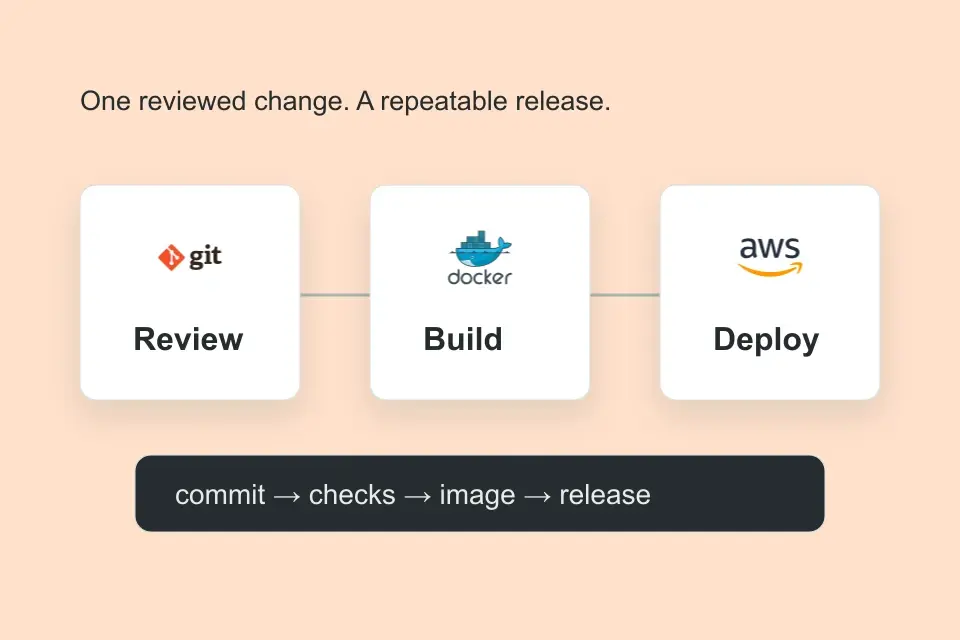
 CloudPros graduate
 CloudPros graduate
 CloudPros graduate
 CloudPros graduate
 CloudPros graduate